
We are currently working on interactions for authoring in XR and invite you to be a part of that journey. This work is a continuation of what we have developed over the first 6 months this year, which you can see in our 6 month review, something we strongly recommend you do, in order to better understand the information below. We also have a list of Basic Terms which will be useful if you are not familiar with this work and we have a list of expected available data for any ‘knowledge object’ in the environment. Note that the current design is for one person, with collaboration features left for the future and is thus not a part of this interaction development effort.
- Tasks
- Interactions to support the Tasks
- Interfaces to enable the Interactions
Tasks
We will be looking at which interactions to accommodate to be able to perform these tasks:
- Creating annotated bibliographies: Read documents and write about them in another document
- Knowledge mapping: Interact with knowledge objects for spatial thinking, memory palace organization and presentation of knowledge
- Information triage: Interact with knowledge objects in flexible ways
- Other: Other interactions which are relevant for academics, to be discussed
Interactions to support the Tasks
The interactions as we understand them include the following. Some are maybe more mundane and external to the development of the new work potential of XR (such as the basic controls, text entry, settings), but they will still need to be integrated with the unique XR controls (such as link management in XR, XR knowledge sculpture management and space management) for a cohesive interaction schema.
Basic Controls
- Import/Export
- Copy/Paste/Duplicate/Cut
- Undo/Redo
Text Entry
- Hardware/Bluetooth Keyboard, pen etc.
- Software Keyboard/Method
- Speech to Text
Text Manipulation
- Highlight/modify
- Annotate substrate/knowledge object
Knowledge Object Management
- Select and Move objects
- View Properties
- Add/Alter Properties
- Show/Hide specific knowledge objects
‘Volume’ Management
- Show/Hide specific volumes (imported Maps, lists etc.)
- Show/Hide specific knowledge objects based on currently selected
- Arrange and store specific configurations into ‘sculptures’
- Modify all knowledge elements in a specific volume…
- Lock selections of objects in space
Environment Management
- Process all knowledge objects, selected objects or selected text
- Modify the environment itself (visual, physics etc.)
Link Management
- Add links to selected text
- Add links to knowledge objects
- Specify what kind of link to add (web, repository, library, geographical location, knowledge map etc.), what type the link is (supporting argument, disagreeing, underlying data etc.) and how it should open (full size, as preview, spatially, taking over or adding to current knowledge sculpture etc.)
- Follow/Open links
AI/Process
- Process all knowledge objects, selected objects or selected text
Settings
- Undo/Redo/Saved States History
- Space Settings
- User Settings
- Customization (handedness, color themes etc.)
Onboarding
- Help/Tutorial
- User Feedback to Developers
- Collaboration
- Customization or Personalization
Interfaces to enable the Interactions
Ring Menu for Selected Text
This Ring menu appears when the user selects text from a substrate and lifts the text up, into a Ring, which is divided into slices which can execute commands or reveal further Rings or allow other interactions.
Ring Menu for Selected Knowledge Objects
This Ring menu appears when the user selects knowledge objects in the space and thus requires a different spawn logic since the user may simply want to move the objects.
Mana Menu on No Selection
The Mana (Hand) Menu appears when the user looks at the palm of their non-dominant hand, making it unsuitable for actions on selected objects and thus a candidate for commands which are not for specific objects.
Direct Manipulation
The user can move knowledge objects freely but should also be able to activate commands directly onto objects. This can be specific twists to reveal or add further information, shake, throw and so on.
Hand Gestures
For right and left, also referred to as dominant/primary and secondary hands, which will be reversible in Settings.
Wrists
Right (cube) and left (sphere) Wrists.
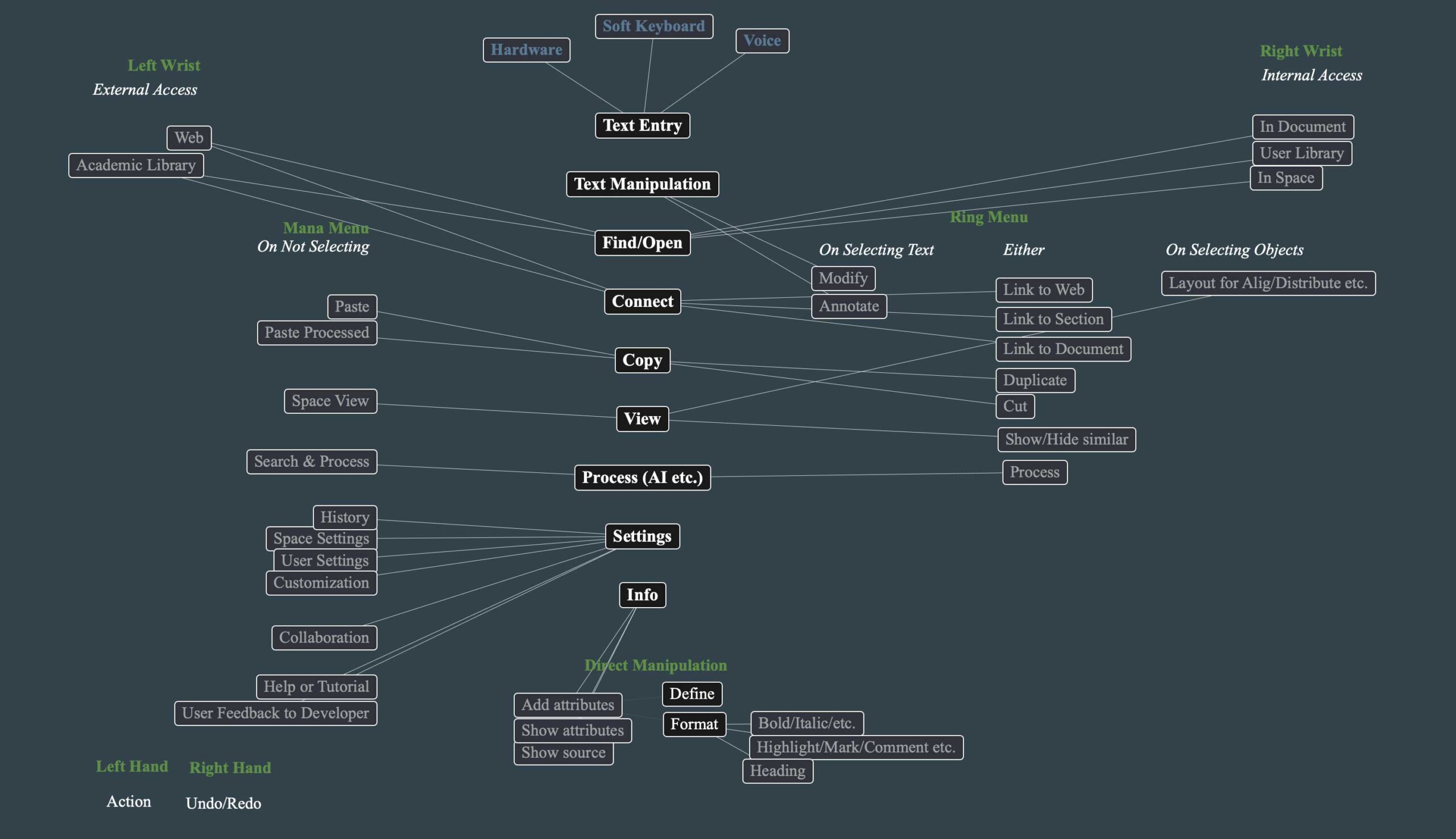
Interactions Mapped to Interface
An initial layout to spark dialog of how what interfaces should enable which interactions. To inspire dialog. Some of these might be natural, many others likely to change considerably through dialog, design and testing:
Dialog
We hope that this will spark both meeting dialog and written dialog, which can then be included in Volume 6 of The Future of Text.
You should feel free to choose to write a full academic article if you like, or sketch up ideas for interactions, even if it is just for one interaction or one task. Our aim here is to capture as much imaginative thoughts before working in XR becomes normalized and more and more interactions will be what big tech mandates to us. You can even create an ad or even an advertising slogan to really put emotion to how you would like to work in XR.
The contributions are gratefully received and you should free to choose what form they should take.