
In 2025 we are looked at authorship in XR with a focus on the process of an academic user constructing a spatial arrangements of knowledge.
An important aspect of this work was that the user can set the parameters of many of the aspects of the experience. It was also important for the user to be able to import their own information and export it for later re-use.
Color Picker
We start with a very basic experience, a Color Picker, which, when viewed in the headset, is a vivid way of experiencing spatiality:
Annotated Bibliography
The Live XR experience to access when you are in your VR/AR/XR headset, as presented at ACM Hypertext ’25: Annotated Bibliography and a version with polish based on feedback: Annotated Bibliography (edit). This experience includes visible citations and virtual keyboard (which can be aligned with physical desk):
Note that you pinch with your right hand (on the left side of text snippets) to select and move, and with your left hand to execute commands.
Knowledge Space
Knowledge Space presented at the World Usability Congress (presentation) with 3D background toggle via left wrist tap and connective lines on pinch, with advanced ‘billboarding’ This demonstrates a ‘Map’ export from an external source via JSON, using macOS Author:
Navigating Directories
XR Directory Navigation. Directory shared via WebDAV thanks to copyparty then exposed temporarily to the whole Internet via ngrok behind HTTPS. An article in the Navigation Space.
Further Knowledge Space XR Experiences
Further experiments to experience for Quest, Vision Pro and other headsets, with video previews: Quarter 2, Quarter 3 and Quarter 4, self hosted with self hosted video.
Presentations
We encourage you to have a look at the state of the work:
1st Quarter Presentation
of the work as of end of March 2025
(specific interactions)
2nd Quarter (midway) Presentation
of the work as of June 2025
The Future of Text Presentation of this Project
November 2025
Integration
If you are a developer or if you use Author, developed by one of our Principal Investigators as a separate project, and you want to integrate with the Knowledge Space, please get in touch. If you come here via Author and want to experiment with the XR uploading, this is the URL you need to append in the XR Export:
https://companion.benetou.fr/index.html?username=q2_visualmetaexport_map_via_wordpress&showfile=
Self Hosting for Document Access
You can host your own files on your own computer for access in XR using Copy Party (a WebDav server). You will first need to download the Python script ‘copyparty-sfx.py’ to your downloads folder from:
github.com/9001/copyparty/releases/latest/download/copyparty-sfx.py
Once downloaded you will need to launch your Terminal and type the following, where [Enter] means you should hit the enter key:
cd Downloads [Enter] (‘change directory’ to change to the Downloads folder)
ls *py [Enter] (optional command to ‘list’ files with ‘py’)
chmod +x copyparty-sfx.py [Enter] (change modes to make it an executable file)
./copyparty-sfx.py [Enter] (to run the executable file)
You should now see something like this, where you can use your own mobile to use the QR code to view the files (only if your computer and phone are on the same Wifi):
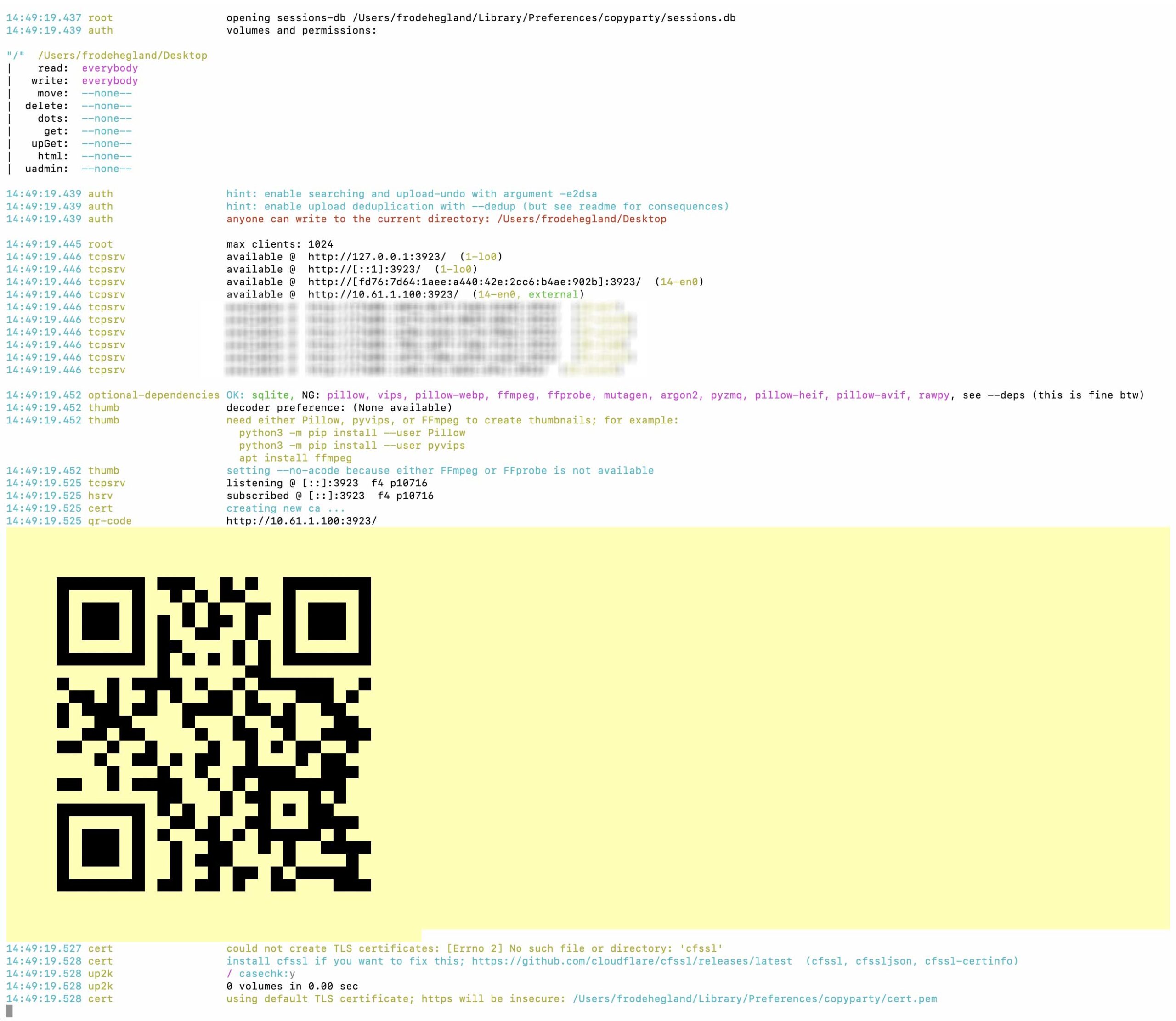
You can now open the following URL in your browser and note that (127.0.0.1) means it refers to your current computer, or ‘local host’:
Note that permissions on different operating systems will differ. Apple’s Safari may require additional steps.
You may choose to install ngrok to simplify this process with permissions from: https://ngrok.com
Walkthroughs
We are also recording in-person walkthrough demo sessions with academics to align with their needs for authoring in XR, which are available to view:
Our specific case is for the user to produce an ‘article’/‘volume’ for the upcoming ‘The Future of Text 6’ presented in a spatial manner. This should include sources from previous volumes and select ACM Hypertext papers in a process of creating an academic annotated bibliography, not simply plain text. We maintain a DevLog to track work after the 1st Quarter Presentation.
Work Done
– a pattern for new prototypes, typically if (username && username == “qN_descriptive_name”) { q4_environmentSetup() } meaning being able to get a new prototype in seconds, including during a conversation
– a pattern for functions within those, e.g. window.functionName = function(){} scoping it there and only there
– a script to facilitate the update of the container running the backend, namely companion_docker_start which allowed for restarting in seconds also during live calls
– a coherent tagging system for video artefacts, e.g. qN_fot_sloan allow for numerous videos while still staying organized
– being able to rely on the API on the video server to include content in XR and facilitate archiving, generalizing the filter pattern further
– setting up mirror from a self hosted forge (Gitea) to the more popular, yet unfortunately not open source, one i.e. Github. This allows for synchronization, letting me enjoy any workflow I want yet others have access through a tool they might be more familiar with for now.
– faciliation tools for others, including parameters to customize experiences without having to code
– iterating on the filter pattern for files and including it in the directory prototypes
– promising beginnings for symetric (VR and VR) and assymetric (mobile and VR) collaboration both internally (only with WebXR prototypes) and also externally, e.g. with DeltaChat
– validation that WebXR worked on new hardware with the release close to the end of the 2nd year of the project of a new headset, prototypes tested on it and working despite having not tested the headset ourselves and consequently with no dedicated work
– maintained velocity of change, namely that each quarter did not see a decrease in the number of prototypes over time, showcasing that the patterns established so far seem to support exploration and also that the space to explore remains vast
This code is funded by the Alfred P. Sloan Foundation
